Operating the three LED pharmacy crosses
Version 0.19, 2026-10-20
Three LED crosses in the shape of pharmacy signs hang side by side. One Resolume Arena composition drives all three. You play five kinds of content on them: Graphics, Visuals, Panorama, Outlines and Strobes. All content is white; you choose the colour per category.
You control it with:
One rule above all: these are pharmacy crosses, not screens. Keep it graphic and bold (see 2.2).
Something wrong? Go to the emergency procedure in 6.9. On site: Adriaan van de Polder (technical, Dick & Dick). Owner of the installation: Gijs Pouwels. Phone numbers: in the printed Quick Guide at the booth.
Each cross is 96 by 96 pixels, with the four corners (32 by 32) unused: that is what makes it a cross. The three crosses sit in a 320 by 180 composition, at x 0, 112 and 224 and from y 42 to 138. Left, Center and Right are called L, C and R throughout this handbook and in Arena.
The crosses follow the look of a real pharmacy sign: solid, graphic shapes, strong colour, clear rhythm. All content was made for that look, pixel by pixel. Treat the crosses as a light object, not as three small video screens.
If you need something that is not there, contact Gijs (see chapter 1).
All content is white on black. Black means the LEDs are off. Colour is added live in Arena, per category, by a colour layer on top of it. No colour chosen means white (for Visuals: the original colours of the material).
The advantage: one set of clips, every colour available at any moment, and all categories stay consistent with each other.
| Category | Where | What it is |
|---|---|---|
| Graphics | per cross (L/C/R) | renders made for the cross shape (G01-G21), pixel exact; numbered from subtle to intense |
| Visuals | per cross (L/C/R) | image material filled into the cross shape |
| Panorama | across all three | movement that runs from cross to cross (P-series) |
| Outlines | across all three, some per cross | lines along the edge of the crosses (O-series), on top of everything |
| Strobes | all three | strobe types and flash |
| Text | per cross or across all three | temperature and ticker, in the Graphics and Panorama layers (2.9) |
The composition also has an FX layer with master effects. FX are not used at ADE; should an FX clip be playing by accident, Stop all clips or fader 7 down removes it.
Graphics are made for the cross shape: every pixel is placed, the shape is always crisp, and the series builds up in intensity. Visuals are image material that fills the cross. Each cross plays one or the other: starting a Graphics clip on a cross stops the Visuals clip on that cross, and the other way around (with the bridge and in the companion; see 3.4 for backup mode). Graphics come first everywhere: first columns on the APC40 in Clip mode, top colour row in Color mode.
From top to bottom. Each category is a group with its own colour layer on top.
| Group | Layers |
|---|---|
| Strobes | Color C, Strobes, Strobe Content |
| Outlines | Color B, Outlines |
| FX | (single layer, master effects; not used) |
| Panorama | Color P, Panorama |
| Graphics | Color A, Graphics R, Graphics C, Graphics L |
| Visuals | Color V, Visuals R, Visuals C, Visuals L |
Why three identical layers for Graphics and Visuals: each cross can play its own clip. The three layers hold the same clips in the same columns.
Column 1 in L and R is Follow Center: that cross shows exactly what the center cross shows. Use it to make all three crosses move as one. In the companion, All 3 does the same by starting the same clip on all three crosses.
The own renders (G, O and P series) are numbered from subtle (low number) to intense (high number). The APC40 (Clip mode) shows 5 clips per layer at a time and scrolls through the rest; the companion shows them all.
Launching a whole Arena column starts clips in several layers at once (Graphics, Outlines and Panorama share columns 1-22). Launch clips per layer: the APC40 and the companion always do.
Five colour rows, one per category: Graphics, Visuals, Panorama, Outlines, Strobes. Each has the same eight presets: Green, Cyan, Blue, Purple, Magenta, Red, Orange, Yellow.
The renders are BPM synced and loop in whole bars. Use tap tempo and resync on the APC40 to lock them to the music. Generators and effects run on their own timeline and are not tied to the beat.
Like a real pharmacy sign, the crosses can show the temperature and a scrolling text (ticker). These are ordinary clips in existing layers, so colour, faders, Graphics/Visuals exclusivity and the APC40 work for them like for any other clip.
| Clip | Layer, column | What it shows |
|---|---|---|
| Ticker | Graphics L, C, R, column 26 | a scrolling text on that cross |
| Temperature | Graphics C, column 27 | the temperature on the centre cross, with small crosses above and below |
| Ticker Wide | Panorama, column 40 | a text through the horizontal arms of all three crosses |
http://<companion>:8090/info.html. Per ticker: text,
speed (slow, medium, fast), scroll or static, size. The temperature
comes from a sensor; after 30 minutes without a value the cross shows
--°C. A text of your own instead of the value is possible
too.| Device | Where | What |
|---|---|---|
| APC40 mkII, Color mode (Pan button) | booth | colour, hue, levels, strobes, transitions, tempo |
| APC40 mkII, Clip mode (Sends button) | booth | clips, levels, strobes, tempo |
| APC40 mkII, Preset mode (User button) | booth | recall and save 40 looks (presets), levels, strobes, tempo |
| Companion Remote | lighting computer (installed, icon on the desktop), always on top of Lightkey | see what plays, start clips, colours, levels |
| Companion in a browser (optional) | venue iPad or any device on the network | same as the Remote |
Faders, strobes and tempo do the same in all APC40 modes. The clip grid, the top knobs, the clip stop buttons, scene launch and the bank select arrows change.
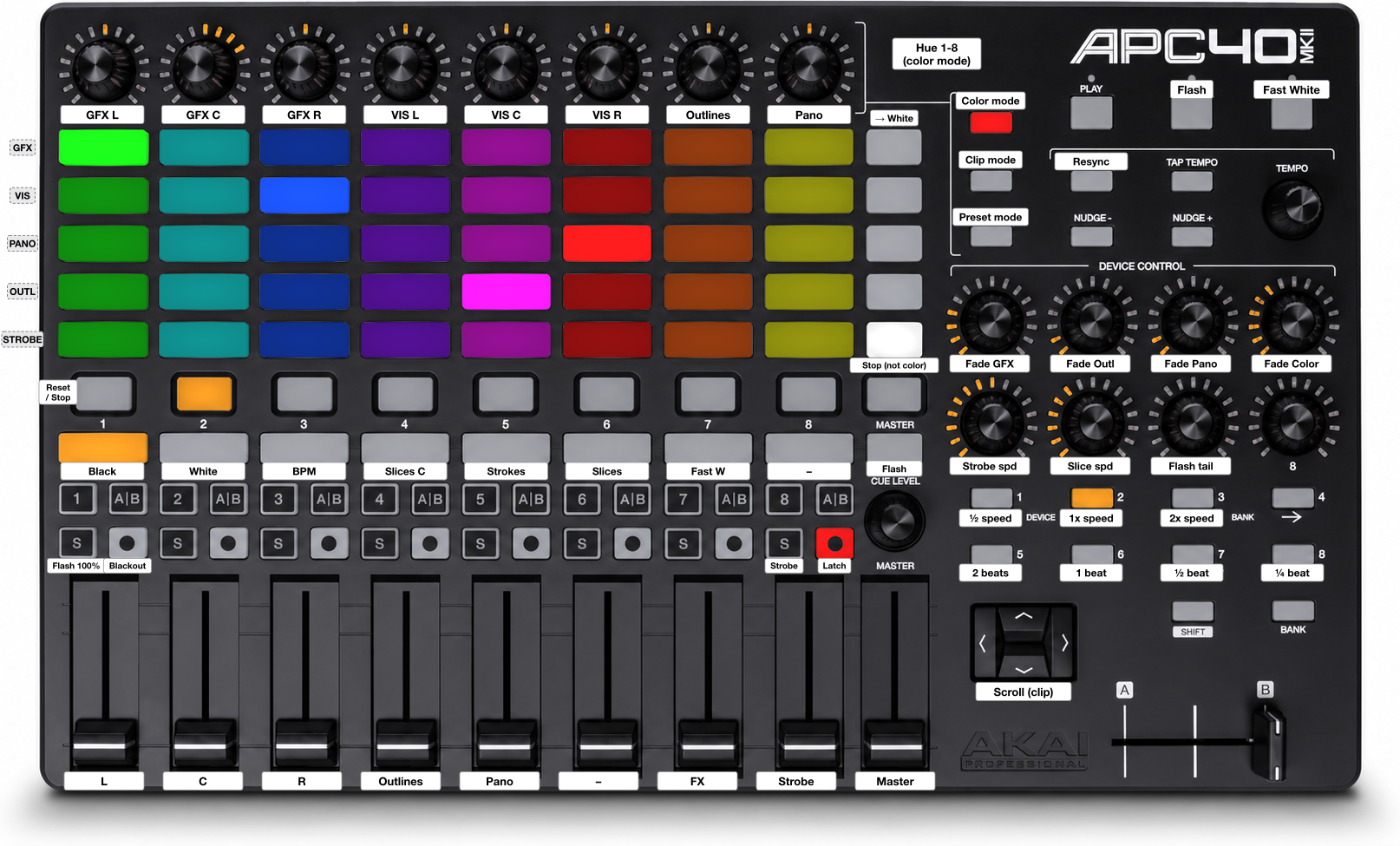
The white stickers on the APC40 name the controls; this chapter gives the sticker text in quotes. The three buttons next to the top knobs switch the mode: “Color mode” (Pan button), “Clip mode” (Sends button) and “Preset mode” (User button); the lit one is active. After every restart of the bridge the APC40 is in Color mode.
The modes only exist with the bridge running. In backup mode the APC40 is always in Color mode.
| Control | Function |
|---|---|
| Grid rows 1-5 (top to bottom; GFX, VIS, PANO, OUTL, STROBE) | colour presets for Graphics, Visuals, Panorama, Outlines, Strobes; columns = Green, Cyan, Blue, Purple, Magenta, Red, Orange, Yellow; bright = active colour |
| Scene launch 1-5 (“→ White”) | that colour row back to white; lit (soft white) = the row is white |
| Top knobs 1-8 (“Hue 1-8”) | hue shift of colour preset 1-8, in all five rows at once; centre = preset colour |
| Clip stop 1-8 (“Reset / Stop”) | reset preset 1-8 to its original hue; lit = that preset is shifted |
During a colour change (transition time, device knob 4) the new colour pad blinks, faster towards the end, and the old one stays lit until the fade is done. Fading to white: the scene launch button of that row blinks.
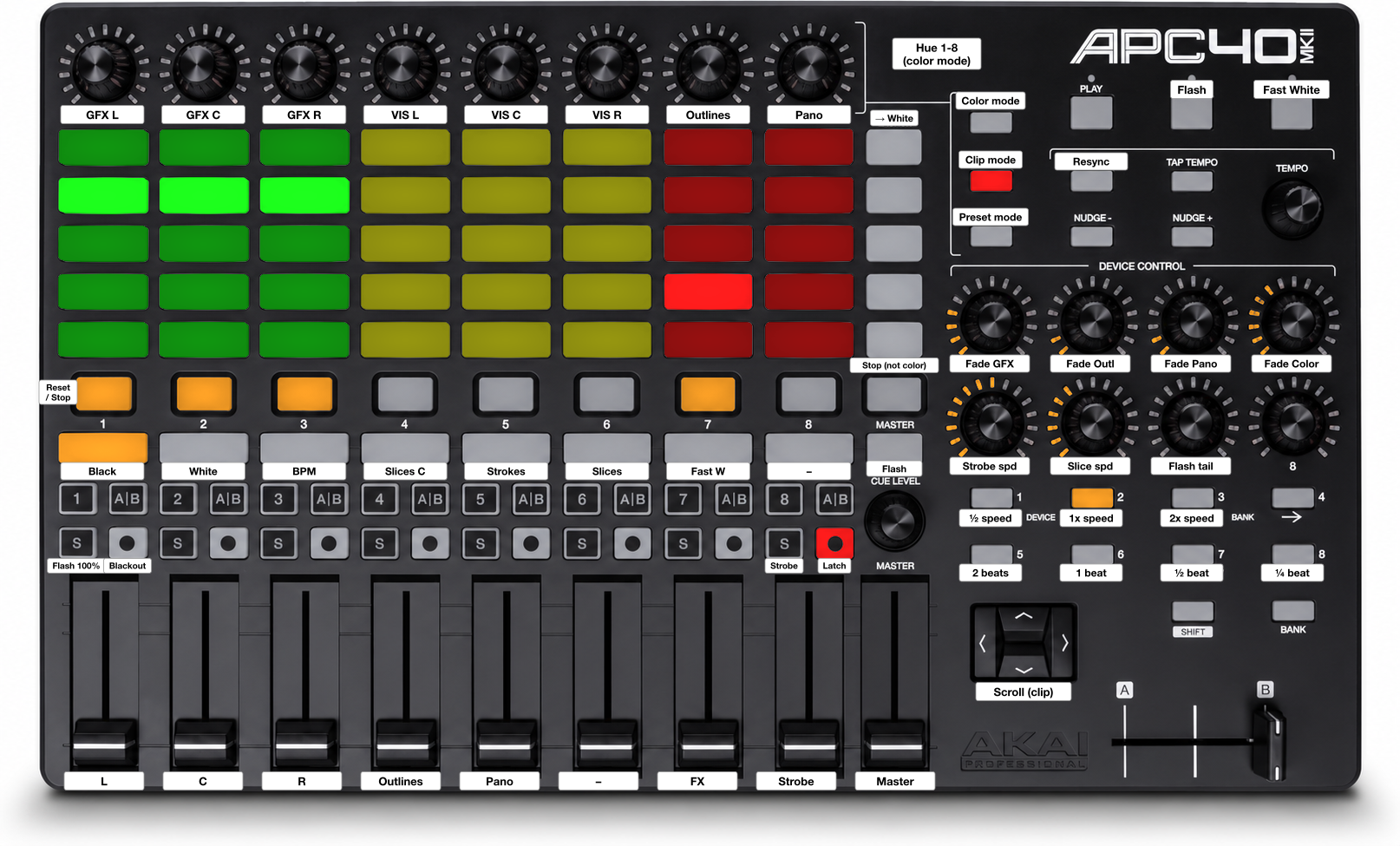
| Control | Function |
|---|---|
| Grid columns 1-8 (“GFX L” … “Pano”) | Graphics L, C, R (green), Visuals L, C, R (yellow), Outlines, Panorama (red); 5 clips per column; bright = playing, dim = clip available |
| Bank select up/down (“Scroll (clip)”) | scroll all columns one clip; with Shift: jump to the first / last clips |
| Bank select left/right | scroll one page (the last visible clip becomes the first). The arrows have no LED |
| Scene launch 1-5 | no function in Clip mode (dark); switch to Color mode to set a colour row to white |
| Clip stop 1-8 (“Reset / Stop”) | stop the layer of that column; lit = playing |
| Top knobs | no function (rings off) |
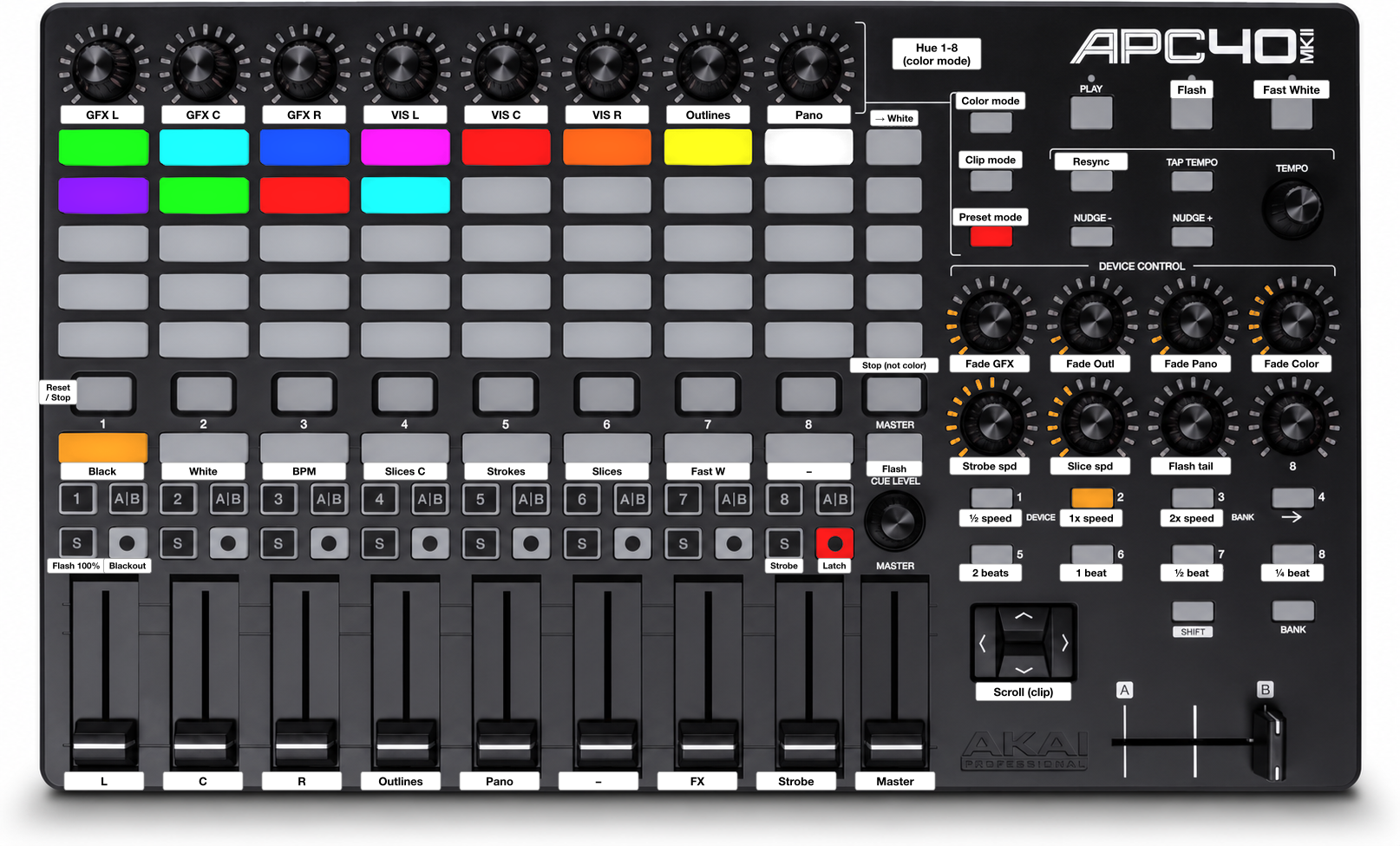
A preset is a saved look: which clip plays on Graphics L, C, R, Visuals L, C, R, Panorama, Outlines and FX, every colour with its hue fine-tuning, the strip faders, and the texts of the temperature and ticker (2.9). Not in a preset: strobes, Flash, tempo, fade times and the measured temperature. There are 40 places, the same on the APC40 and in the companion.
| Control | Function |
|---|---|
| Pads (rows top to bottom, 8 per row) | presets 1-40. Press: recall it. Shift + pad: save the current look there. Hold any clip stop button + pad: delete it |
| Pad LEDs | off = empty; lit in the colour of the look = saved; blinks slowly = recalled last; blinks fast = just saved |
| Clip stop, scene launch, top knobs | no function (clip stop only as the delete key) |
A recall fades with the fade times of the layers (device knobs 1-4). The faders take over again once you move them past their new position (fader catch). Presets are saved on the Arena PC with a picture of the output, and an update never overwrites them.
| Control | Function |
|---|---|
| Fader 1-3 (“L”, “C”, “R”) | cross L, C, R (Graphics + Visuals of that cross) |
| Fader 4 / 5 | Outlines / Panorama |
| Fader 6 | not used |
| Fader 7 | FX (not used; keep it down) |
| Fader 8 | Strobes (intensity) |
| Master fader | everything |
| Round button (strip 1-7, “Blackout”) | that strip on/off (bypass); lit = the strip is off |
| S (strip 1-7, “Flash 100%”) | flash: 100% while held, then back to the fader |
| Strip 8 | strobes, see below |
| Device knobs 1-4 (“Fade GFX”, “Fade Outl”, “Fade Pano”, “Fade Color”) | transition time 0-10 s of Graphics + Visuals, Outlines, Panorama, all colours |
| Buttons 1-4 below the device knobs (“2 beats”, “1 beat”, “½ beat”, “¼ beat”) | beat division (the chosen one blinks at that rate); also sets the speed of the BPM White strobe |
| Device knob 5 (“Strobe spd”) | strobe speed of Black and White (ring shows the setting); also in backup |
| Device knob 6 | speed of Content Slices, Strokes and Slices (ring shows the setting) |
| Device knob 7 | Flash tail: the flash of Master / Record fades out; closed = no tail, open = 3.5 s (finer at the short end) |
| Device knob 8 | not used |
| Tap / Nudge - / Nudge + / Tempo knob | tempo (knob in steps of 0.1 BPM) |
| Metronome (“Resync”) | resync: the beat starts again on this press |
| Stop all clips (“Stop (not color)”) | stop everything except the colours; with Shift: really everything |
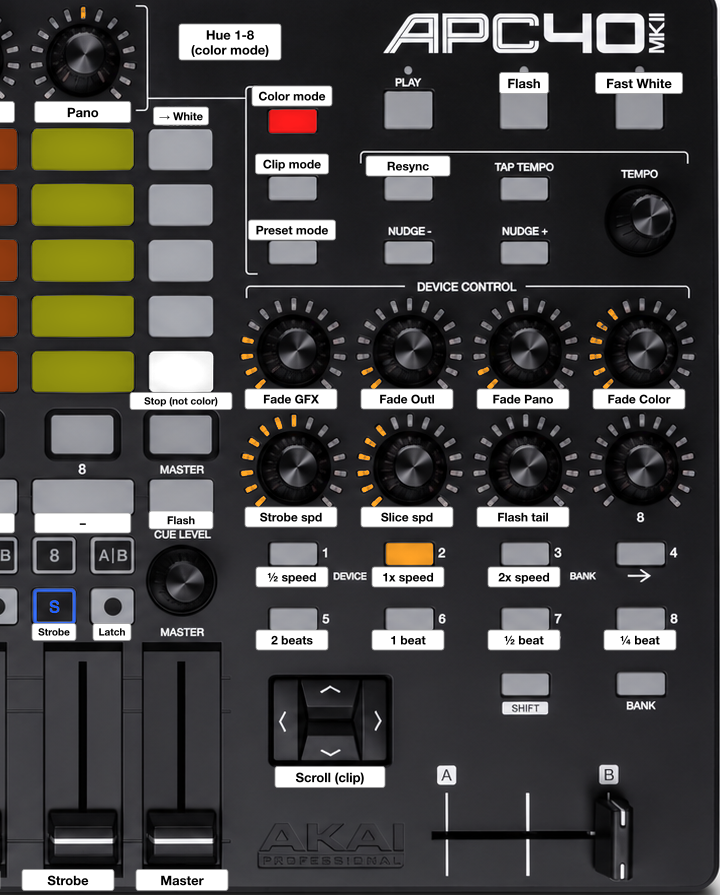
You first choose a strobe, then play it: briefly with S, or latched with the round button.
| Control | Function |
|---|---|
| Track select 1-7 (“Black” … “Fast W”) | choose the strobe: Black, White, BPM White, Content Slices, Strokes, Slices, Fast White. Track select 8 has no strobe for now. Choosing does not start it; if a strobe is playing from S or the round button, it switches to the new one. Blinks slowly = chosen, not playing; lit = playing |
| S (strip 8, “Strobe”) | plays the chosen strobe while held (at start: Black). During a latch: ends it (the strobe plays while held, then stops). Lit while playing from S or latched |
| Round button (strip 8, “Latch”) | latch: the chosen strobe stays on until you press it again, press S, or pull fader 8 to 0. Lit red = no strobe is playing |
| Fader 8 | strobe intensity. Latching with the fader at 0 is fine: then fade the strobe in |
| Session (“Fast White”) | Fast White while held, at the level of fader 8 |
| Master (right of track select 8) and Record (top right) | one Flash in the strobe colour, then back to what was playing; lit during the flash |
Letting go of S or Session always brings back what was playing before, also a strobe started from the companion. Strobes start and stop instantly: the bridge keeps the transition time of the Strobes layer at 0, also when it is changed in Arena.
Choose the strobe with track select in advance (it blinks). Hold S for a short hit, or press the round button to keep it on and press it again (or tap S) to stop.
If a level was changed elsewhere (companion, flash), the fader does nothing until you move it past the current value. Then it takes over. This prevents jumps.
The companion shows the three crosses as they are now (clip, colour, level) and lets you change them. Three ways to open it:
http://localhost:8090/status. Arena connection, APC40, APC
mini (optional), the iPad address with QR code, log, buttons Stop,
Restart, Bridge on/off.Screen layout, annotated screenshot:
Controlling:
?view=1 after the address.Bridge (normal): the companion talks to the APC40. Everything in 3.2 works. Backup (safety net): the companion is off or the bridge is off; Arena reads the APC40 itself with the MIDI preset “ADE Backup”. The layout is the same as far as Arena can do it.
| Bridge | Backup | |
|---|---|---|
| Color mode / Clip mode / Preset mode | yes | Color mode only; no presets |
| Colour pads | show the fine-tuned colour; blink during a colour transition | fixed preset colour, no blinking |
| Top knob rings | show the hue | off |
| Clip stop (APC40) | reset hue, lit = shifted (Color mode) / stop layer, lit = playing (Clip mode) | strip 1-3: stop Graphics and Visuals of that cross; 4, 5, 7: stop Outlines, Panorama, FX; no LED |
| S strip 1-7 | flash with return to fader | no function |
| Strip 8: track select | chooses the strobe; blinks = chosen | starts the strobe: Black, White, BPM White, and Content Slices stay on until the round button or another strobe (pressing the same one again does not stop it); Strokes, Slices and Fast White only while held. Lit = playing, no blinking |
| Strip 8: S | the chosen strobe while held; release brings back what played before | always Fast White while held; after release no strobe plays |
| Strip 8: round button | latches the chosen strobe; lit red = no strobe playing | stops all strobes; no LED |
| Beat division sets BPM White | yes | no |
| Strobe transition time | always 0 | as saved in the composition (0) |
| Master / Record | one Flash, then back to what was playing; fade-out with device knob 7 | one Flash of 0.1 s, no fade-out (the strobe that was playing does not come back) |
| Fader catch | yes | no (faders jump) |
| Graphics/Visuals exclusive per cross | yes | no: stop the other layer yourself |
| Transition knobs | curve (fine at short times) | linear |
| Shift + stop all | everything | not available |
| Companion | works | works if the companion runs (bridge off) |
How you can tell: on the status page, “Bridge” on and the APC40 listed as connected (a missing APC40 is shown in orange; the APC mini is optional: grey is fine). On the APC40, the Pan or Sends button (Color mode / Clip mode) is lit only with the bridge.
Switching to backup: 1. Status page: Bridge off (or Stop if the companion itself misbehaves). 2. Arena: Preferences > MIDI, APC40 mkII on (input and output). 3. Arena: Shortcuts > MIDI preset ADE Backup.
Back to bridge: APC40 off in Arena (input and output), preset ADE Bridge, Bridge on on the status page. The bridge picks up the APC40 within a few seconds.
On Windows only one program can use a MIDI port. With the APC40 on in Arena, the bridge reports “in use by another program” and keeps retrying.
Short and practical: building from calm to peak with these tools, within the design intent of 2.2. Low Graphics numbers in one colour, adding Outlines, Panorama for transitions, strobes and flash for peaks. A starting point, not a script.
Installation is done. This chapter is about getting the show running each night.
Tick list, also as a separate printable page: 1. Crosses and Novastar on. 2. Arena PC on, Arena open with the composition, output active. 3. Companion running (desktop shortcut ADE Crosses Companion); status page shows Arena online and the APC40 connected. 4. Lighting computer: open ADE Crosses Remote from the desktop; it connects by itself. 5. Test: one clip and one colour on each cross; tap tempo.
C:\ADE Crosses\Arena\Pharmacy Sign ADE.avc;
check for missing media.http://<address>:8090/) or QR code.node.exe on private networks;
set the network to “Private”.For the operator: only when Gijs asks for it. - With internet:
desktop shortcut Update ADE Crosses, or
Update on the status page (checks first, then asks). -
If the companion itself changed, it restarts by itself. - What was saved
on the PC wins: a saved composition or mapping is not overwritten; the
new version is placed next to it as
<name> (update <date>).avc / .xml.
Replaced files go to C:\ADE Crosses\_Backups (last ten). -
New composition while Arena has it open: first reopen it in
Arena (Composition > Open), only then save. Otherwise Arena
saves the old one over the new one. The update says so too. - New media
do not come via GitHub but via the USB stick: run
Install on this PC.bat from the stick. The update reports
missing media. - Without internet: run the installer again from an
updated stick.
Arena (Advanced Output, 1024 x 768, 3 slices)
  → HDMI
    → Novastar TB2-4G
→ ethernet → cross L → loop through → cross C → loop through → cross Rlogs\companion.log.| What | Where (Arena PC) |
|---|---|
| Installation | C:\ADE Crosses |
| Composition and media | C:\ADE Crosses\Arena, Arena\Media |
| MIDI presets | Documents\Resolume Arena\Shortcuts\MIDI (ADE Backup,
ADE Bridge); copies in C:\ADE Crosses\Arena |
| Advanced Output preset | ADE Pharmacy Crosses (copy in
C:\ADE Crosses\Arena\Advanced Output, installed into Arena
by the installer) |
| Companion | C:\ADE Crosses\Control, log in
logs\companion.log |
| Backups made by updates | C:\ADE Crosses\_Backups |
| Desktop shortcuts | ADE Crosses Companion, Update ADE Crosses |
| Source | private GitHub repository gijspouwels/ade-crosses (everything except media) |
Organised by symptom. Each line: symptom → check → fix. Searchable list in HTML, tables per category in the PDF.
node.exe, network set to Private), local network
permission on the Mac, companion not running; type the address from the
status pageOne box, also as a separate printable page: back to a working show in 60 seconds. Bridge off, APC40 on in Arena, preset ADE Backup; if Arena itself is the problem, restart Arena and open the composition. Then call Adriaan or Gijs.
All clips per layer, in the order of the Arena columns. Col is the Arena column (the same on L, C and R). Level is the intended intensity, 1 (very subtle) to 5 (very intense): sort a set from low to high. Beats is the loop length. The still shows a few frames of the clip.
| Col | No. | Name | Level | Beats | Role in set | What you see | Still |
|---|---|---|---|---|---|---|---|
| 2 | G01 | Spiral Trace | 1 | 8 | Intro / Break | A single line draws ring after ring towards the core, then erases itself back outwards. |  |
| 3 | G02 | Life | 1 | 16 | Ambient | Conway’s Game of Life inside the cross shape, one generation per eighth note; fades in on beat 1, fades out in the last beat. |  |
| 4 | G03 | Breathe | 1 | 8 | Ambient / Break | Contours slide in and out per bar while the brightness breathes along. |  |
| 5 | G04 | Heartbeat | 1 | 8 | Intro / Break | Heartbeat line (ECG) across the horizontal bar, peak on the beat; the outline flashes along. |  |
| 6 | G05 | Dither Fill | 2 | 8 | Build-up / Riser | Bayer dither fills the cross from bottom to top (4 beats), then dissolves (4 beats). |  |
| 7 | G06 | Draw On | 2 | 8 | Intro / Opener | A pen draws the outline (2 beats), fills ring by ring (2), holds with a pulse (2), drops out (2). Good opener. |  |
| 8 | G07 | Pixel Rain | 2 | 8 | Break / Ambient | Matrix rain per column at three speeds, seamless over 2 bars. |  |
| 9 | G08 | Scanner | 2 | 8 | Groove / Break | A horizontal and a vertical scan line swing back and forth; where they cross, the 32x32 square lights up. |  |
| 10 | G09 | Closing Band | 2 | 4 | Break / Build-up | Rebuild of Stroke Alpha 2: a 4 px band moves from the edge to the core in 3 beats; the fourth beat is black. |  |
| 11 | G10 | Halftone Wave | 3 | 8 | Groove / Ambient | Grid of dots (6 px) that grow and shrink in a wave from the centre, 1 wave per 2 beats. |  |
| 12 | G11 | Inward Rings | 3 | 8 | Groove | Concentric contours move towards the core, with 4 chaser segments running around the edge. |  |
| 13 | G12 | Outward Rings | 3 | 8 | Groove | Contours appear in the core and move to the edge, one per beat. |  |
| 14 | G13 | Counter Rings | 3 | 8 | Groove | Four 2 px bands with dashes; alternate bands rotate in opposite directions, 1 dash per beat. |  |
| 15 | G14 | Cross Tunnel | 3 | 8 | Build-up / Groove | Every beat a new small cross grows from the centre to the edge (tunnel), 4 visible at once. |  |
| 16 | G15 | Fill and Drain | 3 | 4 | Groove / Build-up | Rebuild of Stroke Alpha 1: the cross fills from the edge to the core (2 beats), then drains from the edge inwards (2 beats). |  |
| 17 | G16 | Rotate | 4 | 8 | Drop | Plus in the centre rotates 45 degrees per beat (plus, x, plus…), with a tick on the beat and a flash of the outline. |  |
| 18 | G17 | Checkerboard | 4 | 8 | Drop | Checkerboard flips every beat in a wave from the centre; bar 1 with 12 px squares, bar 2 with 8 px. |  |
| 19 | G18 | Stripes | 4 | 16 | Groove | Hatching moves 12 px per beat; a different angle every bar (/, , horizontal, vertical). |  |
| 20 | G19 | Noise Focus | 4 | 8 | Build-up / Riser | Flickering noise comes into focus on the line cross over 4 beats, holds 2 beats with a pulse, falls back into noise over 2 beats. |  |
| 21 | G20 | Pump | 4 | 4 | Drop | Rebuild of Stroke Alpha 3: from a 2 px outline the cross pumps full and back, twice per bar; full on beats 2 and 4. |  |
| 22 | G21 | Five Blocks | 5 | 16 | Drop | 4 bars: rotating per beat, centre against arms, heartbeat (lub-dub), filling on eighths. |  |
| Col | No. | Name | Level | Beats | Role in set | What you see | Still |
|---|---|---|---|---|---|---|---|
| 2 | V02 | Cross Spin Alt | 2 | 16 | Intro / Groove | Green 3D outline cross spins around its vertical axis; 960x540 source with its own edge. |  |
| 3 | V03 | Cross Spin | 2 | 16 | Groove | Green 3D cross spins and tilts in space. |  |
| 4 | V04 | Cross Spin Zoom | 3 | 32 | Build-up | Spinning green 3D cross zooms in until its arms fill the whole cross. |  |
| 5 | V05 | Cross Zoom | 2 | 8 | Build-up / Transition | Green outline cross zooms from small to large and flies through; briefly empty afterwards. |  |
| 7 | V07 | Caduceus | 1 | 8 | Ambient / Intro | Caduceus (staff with snakes and wings) slowly rotates; grey-purple. |  |
| 8 | V08 | Teeth | 2 | 8 | Groove / Humour | Small chattering false teeth in the centre of the cross; red and white. |  |
| 9 | V09 | Teeth Zoom | 3 | 8 | Build-up | False teeth zoom in until the cross is full of teeth. |  |
| 10 | V10 | Aspirin | 2 | 8 | Groove / Break | Effervescent tablet drops into water and fizzes; narrow vertical strip in the centre arm. |  |
| 11 | V11 | Pills Fill | 3 | 32 | Build-up / Groove | The cross fills up with falling, colourful pills and empties again. |  |
| 12 | V12 | Falling Pills | 2 | 32 | Groove / Break | Loose blue and white pills fall through the cross; often partly empty. |  |
| 13 | V13 | Liquid Cross | 3 | 24 | Ambient / Groove | Completely filled green cross of rippling liquid; a lot of light, calm movement. |  |
| 14 | V14 | Smileys Fill | 3 | 40 | Build-up / Groove | The cross fills up with green smileys and empties again. |  |
| 16 | V16 | Chains Cross | 2 | 8 | Groove | Cross made of chain links; the links rotate around the axis. |  |
| 17 | V17 | Chain DNA | 2 | 8 | Groove | Chain crossbar with a rotating DNA helix as the upright. |  |
| 19 | V19 | Skeleton | 1 | 8 | Ambient / Intro | Standing skeleton with small movements (idle). |  |
| 20 | V20 | Skeleton Salsa | 2 | 16 | Groove / Humour | Skeleton dancing salsa. |  |
| 21 | V21 | Skeleton Macarena | 2 | 16 | Groove / Humour | Skeleton dancing the Macarena. |  |
| 22 | V22 | Skeleton Flair | 3 | 16 | Groove / Drop | Skeleton breakdancing (flair), large fast movements in the lower part of the cross. |  |
| 24 | V24 | Hygieia Snake Spin | 1 | 8 | Ambient / Intro | Bowl of Hygieia with snake slowly rotating; green and white. |  |
| 25 | V25 | Hygieia Snake Zoom | 3 | 8 | Build-up | Bowl of Hygieia zooms in; the snake opens its mouth in close-up. |  |
| 27 | V27 | DNA | 1 | 8 | Ambient / Groove | Vertical DNA helix rotating; blue with coloured bases. |  |
| 28 | V28 | DNA Zoom | 3 | 8 | Build-up | DNA helix zooms in to a close-up of the strands. |  |
| 29 | V29 | DNA Zoom 2 | 3 | 8 | Build-up | Diagonal DNA helix zooms in to a close-up. |  |
| 31 | V31 | Dolphin | 1 | 8 | Ambient / Break | Dolphin floats/swims through the cross in profile; grey. |  |
| 32 | V32 | Dolphin Zoom | 2 | 8 | Build-up / Break | Dolphin swims from far away towards the camera until it fills the cross. |  |
| Col | No. | Name | Level | Beats | Role in set | What you see | Still |
|---|---|---|---|---|---|---|---|
| 1 | P01 | Slow Tide | 1 | 16 | Ambient / Intro | Broad soft band of light (sine) moves across all three crosses over 4 bars; max 60%. |  |
| 2 | P02 | Stardust | 1 | 16 | Ambient / Break | About 260 single pixels softly glowing up and down, spread over the three crosses. |  |
| 3 | P03 | Canon Breath | 2 | 8 | Break / Build-up | The three crosses breathe one after another (left, centre, right), each one beat apart; one breath per bar. |  |
| 4 | P04 | Horizon | 2 | 8 | Groove / Break | Horizontal line with afterglow moves from top to bottom and back over 2 bars, continuous across the three crosses. |  |
| 5 | P05 | Sine Wave | 3 | 8 | Groove | Sine line (1.5 px) runs from left to right through the three crosses; the amplitude breathes per bar. |  |
| 6 | P06 | Ping Pong | 3 | 8 | Groove | A 12 px block bounces through the horizontal bars; when it hits the outer side on the beat, that cross flashes. |  |
| 7 | P07 | Ripple | 3 | 8 | Groove / Build-up | On every beat a ring expands from the centre cross out over the outer crosses. |  |
| 8 | P08 | Diagonal Sweep | 3 | 8 | Groove | Broad diagonal bands move from left to right across the panorama, 1 band per beat. |  |
| 9 | P09 | Cross Chase | 4 | 8 | Drop | Each beat one cross lights up fully and fades: bar 1 left to right, bar 2 right to left. |  |
| 10 | P10 | Equalizer | 4 | 8 | Groove / Drop | Vertical 8 px bars (VU meter) across the full width; heights jump on every eighth. |  |
| 11 | P11 | Bar Storm | 4 | 8 | Drop | Vertical bars of different widths race across the three crosses at different speeds. |  |
| 12 | P12 | Random Strobe | 5 | 8 | Drop / Peak | On every sixteenth a random cross flashes (or all three on the beat). |  |
| 13 | P13 | Strobe Sweep | 5 | 8 | Drop / Peak | Narrow vertical strip that jumps from left to right on sixteenths and strobes, with a flash on the beat. |  |
| 14 | P14 | Cross Spin 1 | 2 | 16 | Intro / Groove | Three green 3D outline crosses spin, exactly on the crosses. Same source as P15-P18; the variants differ in their Arena settings. |  |
| 15 | P15 | Cross Spin 2 | 2 | 16 | Intro / Groove | As P14, with different Arena settings (see the clip in Arena). |  |
| 16 | P16 | Cross Spin 3 | 3 | 16 | Groove / Build-up | As P14, with animated scale (approx. 27-350%) in Arena; the still shows the source without animation. |  |
| 17 | P17 | Cross Spin Clones | 4 | 16 | Drop | As P14, with Linear Cloner (25 clones, 6 tails, rotation); the still shows the source without the effect. |  |
| 18 | P18 | Cross Spin 5 | 3 | 16 | Groove / Build-up | As P14, with animated scale (25-300%) in Arena; the still shows the source without animation. |  |
| 19 | P19 | Cross Spin Zoom | 3 | 32 | Build-up | Large spinning green cross flies in; planes and edges sweep across the three crosses. |  |
| 20 | P20 | Cross Zoom | 2 | 8 | Build-up / Transition | Green outline cross zooms through the centre cross; bars appear across the outer crosses. |  |
| 21 | P21 | Caduceus Zoom | 3 | 8 | Build-up | Caduceus zooms in until wings and snakes fill all three crosses. |  |
| 22 | P22 | Walker Zoom | 2 | 8 | Build-up / Humour | Walking frame (walker) zooms in from the centre; white and blue, a lot of black. |  |
| 23 | P23 | Teeth Zoom | 2 | 8 | Build-up | False teeth zoom in until the teeth stretch across the crosses. |  |
| 24 | P24 | Tunnel Straight | 4 | 8 | Drop / Build-up | Green cross tunnel: crosses shoot straight forward through the centre cross, short loop. |  |
| 25 | P25 | Tunnel Spiral | 5 | 8 | Drop | Green cross tunnel that also rotates; arms sweep across all three crosses. |  |
| 26 | P26 | Tunnel Long | 4 | 32 | Drop / Build-up | Long green cross tunnel over 8 bars; crosses shoot through the centre and across the outer crosses. |  |
| 27 | P27 | Barbed Wire Zoom | 2 | 16 | Break / Transition | Barbed wire swings and zooms across the three crosses; white, a lot of black. |  |
| 28 | P28 | Falling Smileys | 2 | 64 | Groove / Break | Green smileys fall across all three crosses; 16-bar loop. |  |
| 29 | P29 | Falling Pills | 2 | 32 | Groove / Break | Colourful pills fall across all three crosses; often partly empty. |  |
| 30 | P30 | Skeleton Zoom | 3 | 8 | Build-up | Skeleton zooms in until the ribcage fills the centre cross. |  |
| 31 | P31 | Raptor Zoom | 2 | 8 | Build-up / Humour | Raptor (dinosaur) walks towards the camera until it fills the crosses; brown. |  |
| 32 | P32 | Dolphin Zoom | 2 | 8 | Build-up / Break | Dolphin swims towards the camera until it fills the image. |  |
| 33 | P33 | Sonic Zoom | 2 | 8 | Build-up / Humour | Sonic figure zooms in to a close-up; colourful. |  |
| 34 | P34 | Hygieia Snake Zoom | 2 | 8 | Build-up | Bowl of Hygieia zooms in; the snake opens its mouth across the crosses. |  |
| 35 | P35 | Floppy Zoom | 2 | 8 | Build-up / Humour | Green floppy disk (YP) zooms in until it fills the crosses with planes. |  |
| 36 | P36 | DNA Zoom | 2 | 8 | Build-up | Vertical DNA helix zooms in to a close-up. |  |
| 37 | P37 | DNA Zoom 2 | 2 | 8 | Build-up | Diagonal DNA helix zooms in to a close-up. |  |
| 38 | P38 | Memcard PS2 Zoom | 2 | 8 | Build-up / Humour | Red PS2 memory card zooms in; dark. |  |
| 39 | P39 | Memcard GC Zoom | 2 | 8 | Build-up / Humour | Purple GameCube memory card zooms in; dark. |  |
| Col | No. | Name | Level | Beats | Role in set | What you see | Still |
|---|---|---|---|---|---|---|---|
| 1 | O01 | Still Frame | 1 | 16 | Ambient / Intro | Single outer line breathing very slowly between 25% and 50% over 4 bars. |  |
| 2 | O02 | Slow Comet | 1 | 16 | Ambient / Intro | One comet with a long tail (120 px) goes around once in 4 bars. |  |
| 3 | O03 | Marching Dots | 1 | 4 | Ambient / Intro | Dotted line on the outer edge (a dot every 4 px) crawls smoothly and slowly clockwise, 2 dots per bar. Soft variant of Stroke Alpha 4. |  |
| 4 | O04 | Outline Tide | 1 | 16 | Ambient / Intro | Outer line of all three crosses, with a soft wave of light moving across the crosses from left to right over 4 bars. |  |
| 5 | O05 | Draw and Erase | 2 | 16 | Intro / Outro | The line draws itself from the top down both sides to the bottom (6 beats), holds (2), erases from the top (6), 2 beats black. |  |
| 6 | O06 | Breathing Lines | 2 | 8 | Ambient / Break | Outer line and second line (2 px inwards) breathe alternately, per bar. |  |
| 7 | O07 | Twin Comets | 2 | 8 | Groove / Break | Two comets opposite each other, one lap per 2 bars. |  |
| 8 | O08 | Relay Comet | 2 | 12 | Groove / Break | One comet goes around once per bar, each time on the next cross (left, centre, right); the other crosses show a faint edge. |  |
| 9 | O09 | Domino Draw | 2 | 8 | Intro / Build-up | The edge draws itself per cross from the top: left, centre, right (one beat per cross); in bar 2 it erases in the same order. |  |
| 10 | O10 | Arm Chase | 3 | 8 | Groove | Each beat the outline of one arm lights up; bar 1 clockwise, bar 2 anticlockwise. |  |
| 11 | O11 | Corners | 3 | 8 | Groove | The 12 corners of the cross light up one by one per eighth note; then all corners together for 4 eighths. |  |
| 12 | O12 | Beat Pulse | 3 | 8 | Groove / Light drop | 2 px edge flashes on every beat and fades out; beat 1 of each bar is stronger. |  |
| 13 | O13 | Marquee | 3 | 8 | Groove | Theatre-marquee edge: 32 dashes on the outer line move smoothly one position per beat. |  |
| 14 | O14 | Thick Pulse | 3 | 4 | Groove | Outer line jumps 1 px thicker per sixteenth (1 to 4 px inwards) and back, hard pixels without gradient; 2-beat cycle. Rebuild of Stroke Alpha 5. |  |
| 15 | O15 | Marching Blocks | 3 | 4 | Groove | 2x2 px blocks on the edge (2 on, 6 off, evenly spaced everywhere) jump 2 px further per sixteenth, clockwise; hard pixels without gradient. Rebuild of Stroke Alpha 4. |  |
| 16 | O16 | Radar Trace | 3 | 4 | Groove | A radar arm rotates around the centre once per bar and lights up the edge as a thick line (3 px) with a long afterglow. Rebuild of Trace Round. |  |
| 17 | O17 | Mirror Sweep | 3 | 4 | Groove | Two mirrored light paths run down both sides from top to bottom in one beat and back the next, as a thick line (3 px). Rebuild of Trace Up-Down. |  |
| 18 | O18 | Sweep Line | 3 | 4 | Groove / Build-up | A vertical scan line crosses the three crosses from left to right once per bar; the edge lights up where it passes and then fades. |  |
| 19 | O19 | Cross Hop | 3 | 4 | Groove | On every beat the edge of one cross flashes (left, centre, right, centre); the other crosses show a faint edge. |  |
| 20 | O20 | Shockwave | 4 | 8 | Build-up / Drop | On every beat a line runs 7 px inwards from the edge and fades; the centre stays empty. |  |
| 21 | O21 | Chaser | 4 | 8 | Drop | Classic 3-phase chaser (like neon signage) on two lines in opposite directions, a step every sixteenth. |  |
| 22 | O22 | Counter Comets | 4 | 8 | Groove / Drop | Four comets clockwise on the outer line and four anticlockwise on the second line, one lap per 2 beats. |  |
| 23 | O23 | Mixed Directions | 4 | 4 | Groove / Drop | Left: two comets clockwise; centre: three anticlockwise; right: a fast comet outside with a second line running against it. Each cross has its own rhythm. |  |
| 24 | O24 | Glitch Edge | 5 | 8 | Drop / Peak | Edge split into 32 segments; every sixteenth a random selection turns on, the whole edge on every beat. |  |
| 25 | O25 | Strobe Frame | 5 | 8 | Drop / Peak | 2 px edge strobes on sixteenths; full on the beat, half on the off-beats. |  |
| 26 | O26 | Cross Strobe | 5 | 4 | Drop / Peak | On every sixteenth the edge of a random cross strobes; all three together on the beat. |  |
| 27 | O27 | Racer | 5 | 8 | Drop / Peak | Eight comets per line on three lines, one lap per beat, with a flash of the whole edge on every beat. |  |
Not in the clip sheet (checked in Arena on 20 Oct 2026):
| Layer | Col | Clips |
|---|---|---|
| Graphics L, C, R | 1 | Follow Center (L and R show what C shows) |
| Graphics L, C, R | 24, 25 | Fire 1, Fire 2 (generators) |
| Graphics L, C, R | 26 | Ticker (text, see 2.9) |
| Graphics C | 27 | Temperature (text, see 2.9) |
| Panorama | 40 | Ticker Wide (text, see 2.9) |
| Outlines | 29-35 | Slow, Glowing, Fire 1, Fire 2, Fast, Smoke, Wiggle (generators) |
| Strobes | 1-7, 9 | the strobes of 3.2 (track select 1-7) and Flash (Master / Record) |
Generators run on their own timeline and are not tied to the beat (2.8).
Everything can be done with the APC40. The APC mini is only a spare or an extra pair of hands. If it is connected, it is handled like the APC40: off in Arena with the bridge, on in backup mode (Preferences > MIDI, APC MINI).
Same layout as the APC40 in Clip mode, with 7 clips per column. Annotated photo (apcmini.yaml).
| Control | Function |
|---|---|
| Pad columns 1-8 | Graphics L, C, R (green), Visuals L, C, R (yellow), Outlines, Panorama (red) |
| Pad rows 1-7 (top to bottom) | clips; blinking = playing, steady = clip available, off = empty |
| Bottom pad row | stop the layer of that column; red = the layer is playing |
| Arrows up/down (above fader 1, 2) | scroll one clip; with Shift: first / last clips; lit = there is more that way |
| Arrows left/right (above fader 3, 4) | scroll one page (the last visible clip becomes the first) |
| Scene buttons 1-7 | FX clips 1-7 (FX are not used at ADE) |
| Scene button 8 | stop everything except the colours; with Shift: really everything |
| Faders | not used |
The APC mini mk1 has only green, red and yellow pads and no dim setting: that is why a playing clip blinks instead of lighting up brighter.
In backup mode (ADE Backup): no scrolling (clips 1-7 only), stop pads without LED, no Shift + scene 8, Graphics and Visuals do not exclude each other.